Discoverability floor
Google recommends that every page you care about have a link from at least one other page on your site.
Technical SEO · Internal linking · Data-driven architecture
Internal linking works best as an architecture system, not a quota. Combine crawl data, Search Console, GA4 and page roles to identify strong donors and valuable under-supported targets, connect them only when the topic and context fit, then automate and validate the process at scale.
The short answer
Build internal links from page roles + evidence + relevance. Use crawl data to understand the graph, Search Console to see search opportunity, GA4 for onsite/business context, then prioritize donor→target pairs only when the source is strong, the target deserves support and the relationship is topically useful. AI can accelerate candidate discovery, but it should not replace the evidence or human validation.
Google recommends that every page you care about have a link from at least one other page on your site.
Google does not prescribe a universal ideal number of links on a page.
The API exposes clicks, impressions, CTR and average position, alongside requested dimensions.
Search Console covers activity before arrival; Analytics covers behavior after the visit.
01 · Architecture
The useful question is not “where can I add another link?” but “which relationships should the site architecture make explicit?”
Google describes links as both a way to find pages to crawl and a signal that helps determine page relevance. For internal linking, that makes the unit of work a relationship between two pages—not a quota attached to one URL.
A site can contain thousands of internal links and still have weak architecture. Important pages can sit four or five meaningful decisions away from the pages users actually enter, template modules can create dense but low-context link noise, and a new page can be technically present in the sitemap while barely participating in the internal graph.
Custom diagram
A hub, strong donor pages and under-supported targets form a network. The same number of links can produce very different architecture depending on where those links connect and whether the context is useful.
Google also recommends that every page you care about have a link from at least one other page on the site. Treat that as a discoverability floor, not as a complete architecture strategy: one link can make a URL reachable while still leaving it deep, isolated from its topic cluster, or poorly explained by surrounding context.
02 · Evidence
A useful internal-link recommendation starts with a normalized URL inventory that combines technical state, search demand, onsite value and page role.
Start with one row per canonical page. A crawler supplies the structural layer; Search Console supplies Google Search performance; Analytics supplies onsite behavior and business outcomes. Optional backlink and log data can add context for large or complex sites. The point is not to create a giant spreadsheet—it is to make every recommendation traceable to evidence.
| Layer | Fields to collect | What it helps answer | Main caveat |
|---|---|---|---|
| Crawl / architecture | status, canonical, indexability, depth, inlinks, outlinks, template, page role | Can the page participate safely in the graph? Is it isolated or over-linked? | A crawler sees your crawl path, not Google’s complete crawl history. |
| Search Console | clicks, impressions, CTR, average position, query ↔ page relationships | Where is there search visibility, latent demand or a page close to a meaningful result threshold? | Position and CTR are context signals, not standalone quality scores. |
| GA4 | sessions, engaged sessions, engagement rate, bounce rate, average session duration, key events, revenue when relevant | Does the page support useful user journeys or business outcomes after the visit? | Behavior metrics depend on implementation and page purpose; do not turn them into ranking proxies. |
| External / business | referring domains or authority metric, priority, margin, content freshness, owner | Which pages matter strategically and which donors may have additional external support? | Third-party authority metrics are estimates, not Google metrics. |
| Logs / crawl observations | bot requests, frequency, response patterns | How are bots actually requesting important templates and URL classes? | Logs show requests, not ranking value or intent. |
Resolve redirects, consolidate known duplicates to the canonical URL you intend to analyze, and attach template/page-role labels. Keep excluded URLs in a separate diagnostic set instead of silently deleting them.
Pass criterionEach analytical row represents one intended canonical page, with excluded or duplicate states preserved as evidence.
Pull page-level Search Analytics data and, where useful, page × query rows. Store clicks, impressions, CTR and average position for a defined date range.
PathSearch Console API → Search Analytics: query
Pass criterionThe date range, search type and dimensions are recorded, and every joined metric can be traced back to the API/export.
Add organic sessions plus engagement or conversion metrics that match the site’s goals. Preserve the acquisition filter used to define Google organic traffic.
PathGA4 → Reports or Data API
Pass criterionAnalytics metrics are labeled as onsite/user evidence and are not used as direct “link equity” or ranking scores.
Save the dataset, crawl timestamp and measurement window before changing links. This snapshot becomes the comparison point for re-crawl and post-release monitoring.
Pass criterionYou can reproduce the candidate list from the saved baseline rather than relying on a mutable dashboard.
For very large properties, Search Console bulk export to BigQuery can make page/query joins and repeated scoring more practical than dashboard exports. Use it when scale justifies the operational overhead; a smaller site can start with API/export data and a crawler.
03 · Prioritization
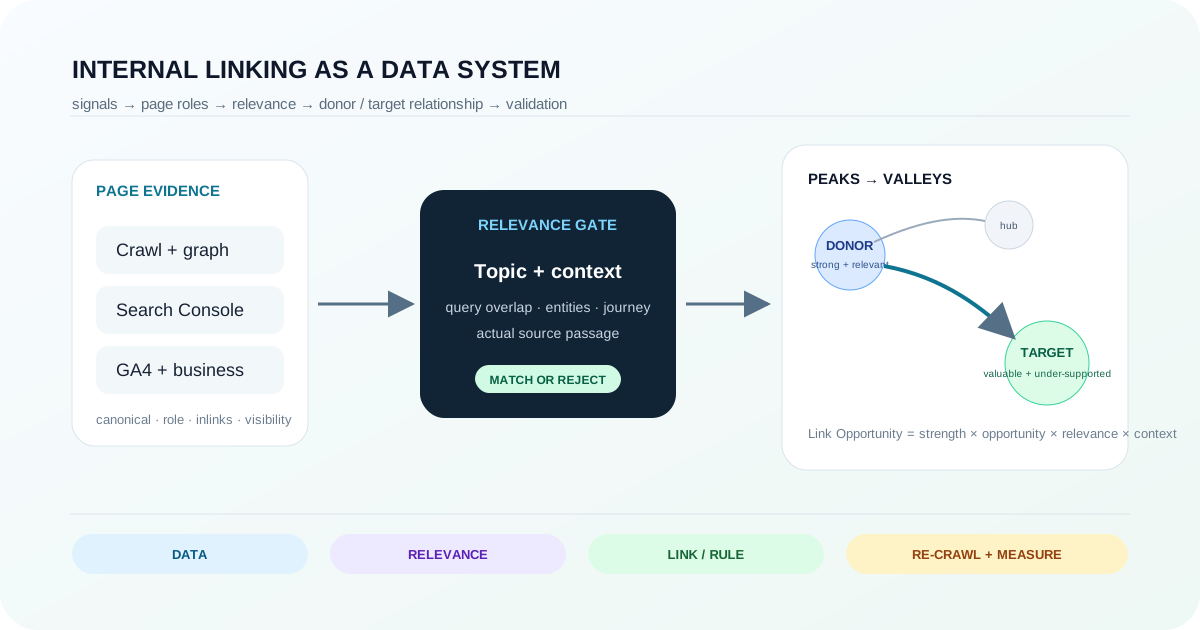
“Peaks and valleys” is a prioritization model: strong relevant donors support valuable under-supported targets. A strong page is not automatically a donor for every weak page.
A peak is a potential donor: technically reliable, already discoverable, structurally connected and useful in a topic where another page needs support. A valley is a potential target: valuable enough to deserve more visibility, but currently under-supported by the internal graph. Traffic alone does not define either role.
I would rank a candidate pair with four separate questions: How strong is the donor? How meaningful is the target opportunity? How topically related are the pages? and does the source page contain a natural context where the link helps the reader?
Custom diagram
Performance and graph signals identify candidate peaks and valleys, but topical relevance and real source-page context determine whether the relationship deserves a link.
| Component | Possible evidence | What raises the score | What should suppress it |
|---|---|---|---|
| Donor strength | visibility, internal inlinks, crawl depth, external support, page role | stable canonical page with meaningful visibility and graph connectivity | redirect/noindex state, obsolete content, weak role, irrelevant template |
| Target opportunity | impressions, position band, business priority, under-linking, depth, query coverage | valuable page with demonstrated demand or strategic role and weak internal support | no clear purpose, duplication, unresolved indexability, intentionally excluded URL |
| Topical relevance | query overlap, entities, taxonomy, page-role relationship, semantic similarity | same task/topic/entity set and a logical user journey | lexical similarity without a meaningful relationship |
| Context fit | actual paragraph, section, component or navigation state | reader benefits from following the target at that point | link exists only to satisfy a score or keyword target |
04 · Indexation
A non-indexed URL can be a serious valley only after you establish that it should be indexed and that internal support is part of the actual problem.
The tempting rule is “not indexed = deepest valley.” I would change it to “not indexed = highest-priority diagnostic state.” Search Console explicitly notes that a not-indexed URL is not always a problem. Some URLs are intentionally excluded, duplicates, alternate canonicals or simply not pages you want in Search.
Start with page purpose. If the URL is a duplicate, parameter state, private/utility page or otherwise not meant for search, exclude it from the target pool instead of trying to strengthen it.
Pass criterionEvery non-indexed candidate has an explicit “should index: yes/no” decision with a reason.
Use Page Indexing and URL Inspection. Check status, crawl allowance, noindex, canonical selection and whether the live page is available as intended.
PathSearch Console → URL Inspection
Pass criterionThe current indexability/canonical state is known; you are not treating absence from the index as a generic internal-link problem.
If the page is noindex, canonicalized elsewhere, broken, duplicate or technically unreliable, fix or intentionally preserve that state first. Internal links cannot logically override an intentional exclusion strategy.
Pass criterionThe page returns the intended status, directives and canonical relationship before it receives priority-link work.
Once the page is useful, indexable and canonical, connect it from relevant crawlable pages and re-inspect/re-crawl. Internal linking becomes one remediation step, not a universal indexation fix.
Pass criterionThe target is reachable through crawlable HTML links from relevant pages and the new path is present in rendered output.
05 · Relevance
Semantic similarity is a filter. The final decision should still be made in the actual source-page context.
Google’s own link guidance is unusually practical here: anchor text should be descriptive, reasonably concise and relevant to both the source and destination, and the words around the link provide context. That is a strong reason to evaluate the source passage, not only two page-level embeddings.
Choose the mechanism after the relationship is clear. A contextual editorial link is strong when the source text already introduces the target concept. Breadcrumbs express hierarchy. Hub/category modules express membership. Navigation expresses persistent importance. Related-content modules can support exploration, but they should not become a random “SEO links” bucket.
06 · Link volume
The right number is a consequence of page function and information architecture, not a site-wide quota.
Google states that there is no magical ideal number of links a page should contain. That makes “30 links per page” or “add five contextual links to every article” poor default rules. A product category, a long research guide and a login screen have different navigation needs.
For automated systems, it can still be useful to set an operational cap such as “return no more than N candidates per source for human review.” That is a workflow constraint to control noise and QA effort—not an SEO threshold and not a statement about how many links Google wants.
07 · Scale
At scale, the best fix may be one template rule rather than hundreds of manually inserted links.
Manual linking stops scaling when the same relationship repeats across product pages, documentation, location pages, programmatic landing pages or multilingual inventories. Before automating individual insertions, group candidate pairs by relationship type. If 750 product pages all need a path to the relevant category hub, the real artifact may be one tested template rule.
| Rule field | Example question | Why it exists |
|---|---|---|
| Eligible source roles | Which templates may emit this relationship? | Prevents a global rule from leaking into irrelevant page types. |
| Eligible target roles | Which canonical/indexable targets can receive it? | Keeps redirects, noindex pages and duplicate variants out of production links. |
| Relevance gate | What taxonomy/entity/query relationship must be true? | Makes relevance testable instead of subjective after deployment. |
| Placement mechanism | Contextual passage, breadcrumb, hub, related module or navigation? | Encodes the architecture intent instead of just emitting an href. |
| Operational cap | How many candidates should the system surface for review? | Controls review noise; it is not a Google link-count rule. |
| Validation | What must a re-crawl prove after release? | Turns automation into a reversible, testable system. |
08 · AI-assisted workflow
AI is useful for classification, semantic matching and context inspection when the evidence contract is explicit and production changes remain reviewable.
On a site with tens of thousands of URLs, the potential donor-target matrix is too large for manual comparison. AI can help classify page roles and topics, cluster entities, rank semantically plausible pairs, inspect the actual donor passage and produce a review queue. The data that justifies the recommendation should still come from the crawl, Search Console, Analytics, URL state and the source content itself.
Custom diagram
The agent receives normalized site evidence and constraints, ranks candidates, returns explainable suggestions, and hands implementation back to a human or controlled rule. Re-crawl and measurement close the loop.
{
  "sourceUrl": "https://example.com/guides/technical-seo/",
  "targetUrl": "https://example.com/guides/internal-linking/",
  "relationship": "technical-seo -> internal-linking methodology",
  "scores": {
    "donorStrength": 0.82,
    "targetOpportunity": 0.76,
    "topicalRelevance": 0.91,
    "contextFit": 0.85
  },
  "evidence": {
    "sourceStatus": 200,
    "targetIndexable": true,
    "targetImpressionsWindow": "defined in baseline dataset",
    "matchingSection": "Site architecture and crawl paths"
  },
  "suggestedAnchor": "internal linking architecture",
  "action": "human-review",
  "confidence": "medium"
}
Illustrative schema only. The numeric values are internal normalized scores, not Google metrics; the agent should return the underlying evidence so a reviewer can reject the recommendation.
09 · Validation
Implementation is complete only when the new relationship exists in rendered output, the target remains valid and the baseline can be compared with post-release data.
Confirm the source returns 200, emits a crawlable <a href> to the intended canonical target and does not create new redirect or noindex hops.
Pass criterionThe intended source→target edge exists in crawlable HTML/rendered output, and both URL states match the rule.
Compare depth, inlink counts, orphan/near-orphan state and rule coverage to the frozen baseline. Check that the rule did not create unrelated link explosions.
Pass criterionThe target cohort receives the intended structural support without unexpected cross-cluster edges.
Track clicks, impressions, CTR, position and page/query relationships over a consistent post-release window. Avoid claiming causation from a single URL or a few days of volatility.
PathSearch Console → Performance or Search Analytics API
Pass criterionThe same metric definitions and filters are used before and after the change, and the target cohort is preserved.
Check whether the linked journey produces useful sessions, engagement or business events. Expect clicks and sessions to differ because Search Console and Analytics use different systems and definitions.
Pass criterionSearch and onsite metrics are reported side by side with their source, not merged into one undocumented success score.
| Layer | Pass evidence | Useful measures | Limitation |
|---|---|---|---|
| Technical | crawlable source href; intended target status/canonical; no new broken hops | edge exists, target state, depth, inlinks | proves implementation, not ranking impact |
| Search | consistent target cohort before/after | impressions, clicks, CTR, position, query coverage | many external factors can change Search performance |
| User / business | linked journeys remain useful | sessions, engaged sessions, key events, revenue if relevant | instrumentation and page purpose shape the metrics |
| System quality | rule produces relevant candidates with low rejection/error rate | coverage, reviewer rejection rate, duplicate/invalid candidate rate | internal QA metric, not a search-engine metric |
For causal confidence, prefer controlled rollout where the site allows it: change one relationship class, preserve the target/source cohorts, avoid simultaneous large content or template changes, and record the release date. Even then, treat organic movement as evidence consistent with the intervention rather than proof that one link caused one ranking change.
10 · Operating model
A scalable system makes the reasons for adding, withholding and validating a link explicit.
The practical principle is simple: do not move “link equity” blindly from pages with big numbers to pages with small numbers. First decide what the target deserves, then find a relevant donor and the correct mechanism, and finally verify that the relationship exists and remains useful.
The main limitation is attribution. Internal linking changes architecture, discovery paths and context, but search performance is affected by many concurrent systems. The method is strongest when it produces better, explainable site structure even before you observe a ranking change.
Primary sources and documentation
Every changing search, browser, interface or technical-behavior claim in this guide is tied to a current primary source.
Need help diagnosing and implementing the fix?
Metricum Lab can combine crawl architecture, Search Console/analytics evidence and business priorities into a donor-target map, template rules and a validation plan without mixing the informational guide with the commercial audit workflow.
Explore Internal Linking Audit & Optimization