Google processing phases
Google documents JavaScript processing as crawling, rendering and indexing—not one synchronous fetch.
JavaScript SEO · Rendering · Indexing debugging guide
My recommended order is to prove where the page diverges before debating frameworks. Compare the HTTP response, the browser-rendered DOM and Google's rendered evidence; then fix the earliest layer that loses critical content, links or indexation signals.
The short answer
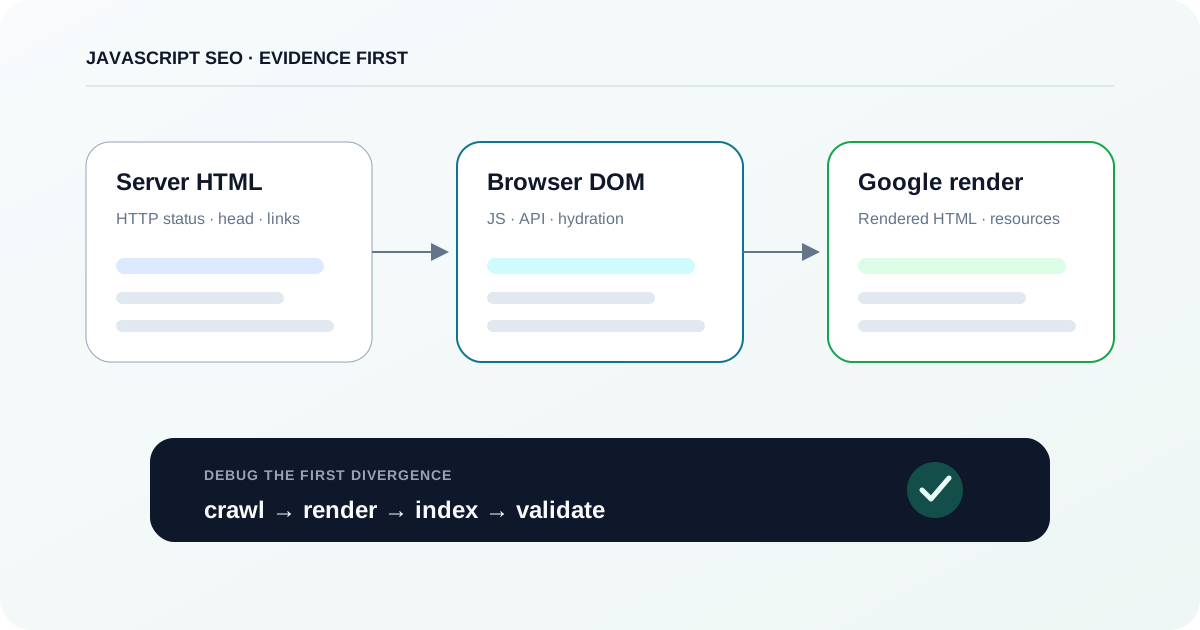
Do not start by asking whether Google can run your framework. Start with one representative URL and compare three artifacts: the raw HTTP response, the browser-rendered DOM, and Google-rendered evidence from URL Inspection or Rich Results Test. The first layer where critical content, links, canonical/robots signals or status behavior diverges tells you what to debug next.
Google documents JavaScript processing as crawling, rendering and indexing—not one synchronous fetch.
Google says pages returning HTTP 200 are queued for rendering unless a robots directive blocks indexing; non-200 responses may skip rendering.
Google generally parses links when they are anchor elements with href; script-only pseudo-links are not a reliable substitute.
Google's crawler infrastructure defaults to the first 15 MB of a file, but individual crawlers and file types may use different limits—so treat this as an infrastructure bound, not a universal Googlebot HTML threshold.
01 · Scope the failure
A JavaScript SEO bug is easier to localize when you preserve three artifacts from the same URL: server HTML, browser-rendered DOM, and Google-rendered output.
A blank view-source: response does not prove that a page cannot be indexed, and a perfect browser screenshot does not prove that Google received the same content. My default debugging model is a three-state comparison. State 1 is the HTTP response before client JavaScript. State 2 is the DOM after your browser executes scripts and fetches data. State 3 is the HTML and resource evidence returned by Google's rendering tools. Fix the earliest state where a critical signal disappears; later symptoms often inherit that failure.
02 · Model the pipeline
Google's JavaScript pipeline has distinct stages and queues. A failure in discovery is not the same problem as a render failure, and a successful render does not guarantee indexing.
Google Search documents three main phases for JavaScript pages: crawling → rendering → indexing. Googlebot first fetches the URL if robots.txt permits it and extracts links from the response. Pages with HTTP 200 are then queued for rendering unless a robots directive tells Google not to index; the queue can clear in seconds or take longer. A headless evergreen Chromium executes JavaScript, then Google parses the rendered HTML again for links and uses that output for indexing. This is why 'Google fetched the URL' and 'Google indexed the rendered content' are different statements.
Custom diagram
The same URL produces evidence at crawl, render and index stages. Each stage can fail independently and should have its own test artifact.
03 · Preserve the baseline
The server response is your control sample. Capture status, directives, canonical, key content and crawlable links before evaluating the client-side app.
Request the exact canonical URL without relying on browser state. Save the final status after redirects and check robots-related HTTP headers.
PathTerminal → curl -I https://example.com/path
Pass criterionThe intended indexable URL resolves to the expected final URL and meaningful HTTP status; no unexpected X-Robots-Tag blocks indexing.
Capture the response body so the team can compare it with rendered output later. Record title, canonical, robots meta, H1/primary content and representative internal links.
PathTerminal → curl -sS https://example.com/path -o server.html
Pass criterionCritical SEO signals that the architecture promises to server-render are actually present and correct in server.html.
Open the page with DevTools already recording so cached assets do not hide first-load behavior. Select the main document and inspect Headers and Response.
PathChrome DevTools → Network → reload → [main document] → Headers / Response
Pass criterionDevTools shows the same final status and expected initial HTML as the independent curl capture.
For intermittent hydration or bundle issues, force a first-load request instead of diagnosing a cached success.
PathChrome DevTools → Network → long-press Reload → Empty Cache And Hard Reload
Pass criterionThe page still receives the required document, scripts and data on a cold load without new blocking failures.
URL='https://example.com/products/42'

curl -sS -L -D response-headers.txt "$URL" -o server.html

printf '\nStatus chain and headers saved to response-headers.txt\n'
printf 'Raw response HTML saved to server.html\n'

# Optional spot checks; inspect the full HTML rather than trusting these alone.
grep -i -m1 '<title' server.html || true
grep -i -m1 'rel="canonical"' server.html || true
grep -i -m1 'name="robots"' server.html || true
Environment: curl plus standard shell tools. This captures evidence; it is not a DOM parser and will not show client-generated content. Validate findings against rendered DOM and Google-rendered output.
04 · Reproduce in a browser
A rendered DOM can look correct while relying on fragile API calls, state, blocked resources or script-only navigation. Keep the dependency chain with the DOM evidence.
Search for a distinctive phrase from the primary content, the canonical link and representative internal links after the app settles.
PathChrome DevTools → Elements → Ctrl/Cmd+F
Pass criterionCritical content and SEO elements exist in the rendered DOM and are not hidden behind a later user action.
If the content is absent from server HTML but appears later, identify the API/data request and its initiator. Check status, response payload and whether the request depends on auth, cookies or client state.
PathChrome DevTools → Network → Fetch/XHR → [request] → Headers / Response / Initiator
Pass criterionThe required data request succeeds on a clean load and does not require state unavailable to a crawler.
A hydration mismatch, uncaught exception or blocked module can stop the app before the critical subtree is created.
PathChrome DevTools → Console
Pass criterionNo uncaught error or failed critical dependency prevents the main content, metadata or links from rendering.
Do not test only by clicking from the home page. Load a deep URL as the first request because crawlers discover and fetch URLs independently.
PathNew Incognito window → paste deep URL → open DevTools → reload
Pass criterionThe deep route returns valid content and status without relying on previous SPA state, localStorage or cookies.
WRS does not retain localStorage, sessionStorage or HTTP cookies across page loads. If a route becomes complete only after a previous in-app navigation, your normal browsing session can hide a crawler-visible bug. Test every representative route as an independent entry point.
05 · Compare Google evidence
Browser parity is necessary but not sufficient. Use Google's own rendering tools to inspect rendered HTML, loaded resources and JavaScript failures.
Use URL Inspection to understand the stored/indexed state and canonical/indexability signals for the exact URL in your Search Console property.
PathSearch Console → URL Inspection → inspect URL
Pass criterionYou have recorded the indexed state, last crawl evidence and canonical/indexability result before running a fresh test.
Run the live test, then open the tested-page evidence. Compare a distinctive content phrase, link targets, canonical/robots signals, screenshot and failed resources with your browser baseline.
PathSearch Console → URL Inspection → Test Live URL → View tested page → HTML / Screenshot
Pass criterionGoogle's live render contains the critical content and crawlable links, and required first-party resources are not failing.
Google's JavaScript troubleshooting documentation recommends Rich Results Test as another way to see loaded resources, console output and rendered DOM. Structured data is not the only reason to use it during rendering diagnosis.
PathRich Results Test → URL → Test URL → rendered-page details
Pass criterionThe public Google render reproduces the expected critical DOM or gives a resource/console failure you can investigate.
06 · Localize the root cause
Treat each failure as a falsifiable hypothesis. The useful question is not 'is JavaScript bad for SEO?' but 'which required signal is missing at which layer, and why?'.
Custom diagram
Compare the same critical signal in server HTML, browser DOM and Google-rendered HTML. The first missing layer narrows the likely cause and the next test.
| Symptom | Likely cause | Test | Preferred fix | Validation |
|---|---|---|---|---|
| App shell in server HTML; content appears in browser | CSR depends on JavaScript + data fetch | Compare server.html, Elements and Google-rendered HTML | Ensure critical content is reliably renderable; use SSR/prerender/hybrid rendering when the dependency is too fragile | Critical content appears in Google-rendered HTML on representative routes |
| Links work on click but crawler misses destinations | Script-only navigation or anchor without href | Inspect rendered DOM for <a href> | Emit real crawlable anchors; enhance navigation with client routing | Destination URLs appear as href links in rendered HTML |
| Browser page is indexable; Google render shows noindex | Initial robots meta or X-Robots-Tag differs | Check raw response + headers before JS | Ship the intended robots directive in the initial response | Server and Google-rendered directives agree |
| Wrong or multiple canonical after hydration | Client code mutates/injects conflicting canonical | Compare source head and rendered head | Prefer stable HTML canonical; if JS must set it, keep one consistent value | Exactly one intended canonical in rendered HTML |
| Missing product returns 200 app shell | Client-side soft 404 | Direct request to missing route + URL Inspection | Return meaningful server status or route to a real 404/noindex error state | Missing URL is no longer treated as a normal 200 content page |
| Below-fold content absent in Google render | Lazy loading waits for scroll/click | Google-rendered HTML + browser test without interaction | Load relevant content when it becomes visible; do not require explicit user action | Content appears without simulated click/scroll dependency |
| Deep route works after navigation but fails on direct load | App relies on prior cookies/storage/session state | Open deep URL in a fresh incognito context | Make crawlable content self-contained for each URL | Fresh direct load renders the same critical content |
| Old JS seems to render old markup | Aggressive crawler/WRS caching + non-fingerprinted assets | Compare requested asset URLs and deployed hashes | Use content fingerprinting for versioned JS/CSS assets | Google test fetches the current asset version |
07 · Choose architecture deliberately
Rendering strategy is a trade-off, not a ranking switch. The SEO goal is dependable crawlable/indexable output; the product goal also includes latency, cacheability, server cost and interactivity.
Google still recommends server-side or pre-rendering because it is faster for users and crawlers and not every bot executes JavaScript. Its dynamic-rendering documentation now treats bot-specific dynamic rendering as a workaround rather than a long-term solution, recommending SSR, static rendering or hydration instead. For a hybrid application, I would render the SEO-critical route state on the server or at build time when possible, then hydrate or enhance it on the client.
Custom diagram
Start with the page's search-critical content and freshness requirements, then choose the simplest mode that makes the initial route dependable without sacrificing product constraints.
08 · Fix the implementation contract
The safest implementation is one where every important URL is a real entry point with crawlable navigation, meaningful status and deterministic critical content.
<nav>
  <a href="/products" data-route>Products</a>
  <a href="/services" data-route>Services</a>
</nav>

<script type="module">
  document.addEventListener('click', (event) => {
    const link = event.target.closest('a[data-route]');
    if (!link || event.metaKey || event.ctrlKey) return;

    event.preventDefault();
    const url = new URL(link.href);
    window.history.pushState({}, '', url.pathname);
    renderRoute(url.pathname);
  });
</script>
Illustrative framework-neutral pattern. The key SEO property is the real <a href>; History API enhancement should not remove direct server handling for the destination URL.
import { RenderMode, ServerRoute } from '@angular/ssr';

export const serverRoutes: ServerRoute[] = [
  { path: 'products/**', renderMode: RenderMode.Server },
  { path: 'guides/**', renderMode: RenderMode.Prerender },
  { path: 'account/**', renderMode: RenderMode.Client },
];
Illustrative configuration based on current Angular SSR documentation. Route choice depends on data freshness, authentication, deployment and caching. Verify the exact API against your installed Angular version before copying into production.
09 · Close the loop
A one-URL live test is not enough for a template-level change. Validate multiple route types, preserve artifacts and monitor the same invariants after releases.
Repeat the same server capture, browser DOM check and Google live render that proved the original failure. Change only one hypothesis at a time when possible.
Pathcurl + Chrome DevTools + Search Console URL Inspection
Pass criterionThe previously missing critical signal is present at all required layers and no new directive/status mismatch appeared.
Test at least one fresh direct URL from every materially different route mode or template: SSR, prerendered, CSR-only, parameterized and error routes as applicable.
PathRelease QA matrix → route class → representative URLs
Pass criterionEvery route class meets the same content, link, status, canonical and robots acceptance rules.
Use Search Console crawl/indexation reporting and, when available, verified server/edge logs. Client analytics alone is not a complete record of Googlebot/WRS activity.
PathSearch Console → Settings → Crawl stats; Page indexing; server/edge logs
Pass criterionNo release-linked spike in fetch errors, unintended exclusions or loss of priority-route discovery appears in the monitored segment.
The practical principle is simple: rendering is validated when the same search-critical contract survives an independent HTTP fetch, a clean browser render and Google's render—not when the framework demo looks correct. If those three states agree, move on to indexation and quality signals. If they do not, preserve the diff and fix the earliest failing layer.
Primary sources and documentation
Every changing search, browser, interface or technical-behavior claim in this guide is tied to a current primary source.
Need help diagnosing and implementing the fix?
Metricum Lab can trace crawl, server-response, rendering and indexation evidence across representative route types, then convert the findings into prioritized fixes with acceptance criteria and post-release verification.
Explore Technical SEO services