Maximum example rows per Page indexing issue
Google says the examples table is limited to 1,000 rows and may not contain every URL in that status, even when fewer than 1,000 URLs are affected.
Technical SEO · Crawl & indexation · Evidence-first debugging
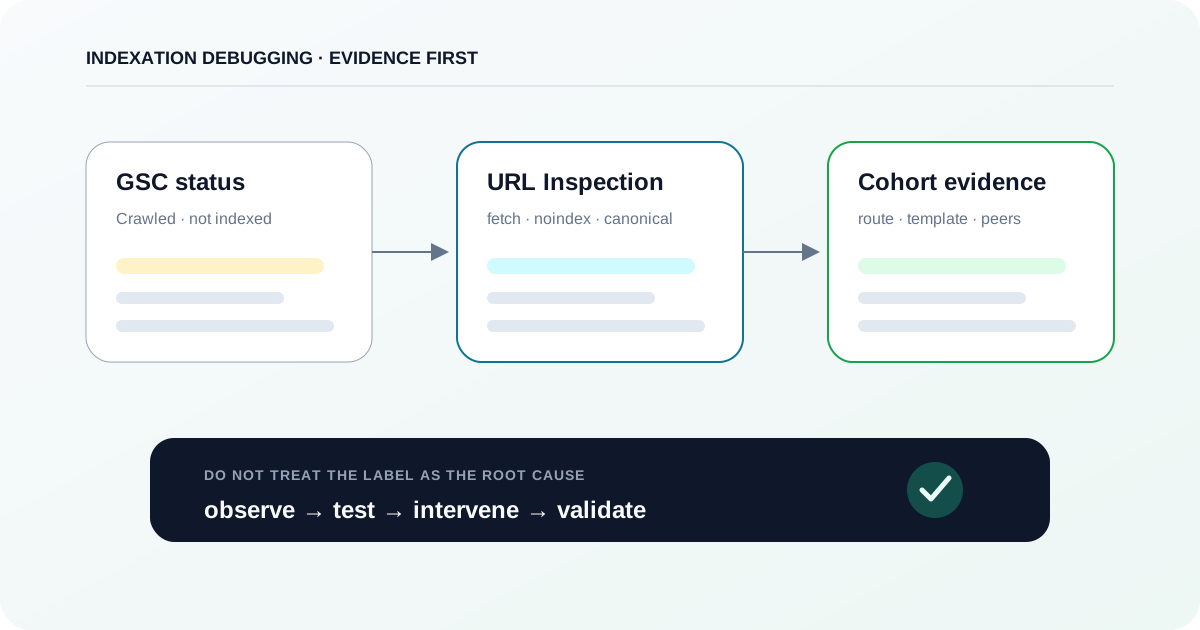
Treat “Crawled — currently not indexed” as a starting observation, not a root cause. Confirm what Google currently knows about the URL, rule out hard eligibility and rendering failures, compare affected pages as cohorts, then test duplicate/value hypotheses with one controlled intervention at a time.
The short answer
Do not start by rewriting the page or repeatedly requesting indexing. First use URL Inspection to confirm the current indexed state and last crawl, then test the live URL for crawl/indexability/rendering. If those checks are clean, diagnose the affected URLs as cohorts for canonical duplication, soft-404/rendering patterns, internal discovery and genuine value differences. Make one change that matches the evidence and verify the same cohort again.
Google says the examples table is limited to 1,000 rows and may not contain every URL in that status, even when fewer than 1,000 URLs are affected.
For a URL that is not on Google, Google highlights Crawl allowed?, Page fetch, Indexing allowed? and Google-selected canonical as important fields.
The default Google Index view reflects Google's stored information; Test live URL checks the current page against many eligibility requirements but is not used by Google for indexing.
The official definition states only that Google crawled the page but did not index it. It does not identify one universal technical or content cause.
Stage 1 · Verify the observation
The Page indexing report is a site-level diagnostic view, not the source of truth for one URL. Start with the current URL state and crawl date.
Google defines Crawled — currently not indexed narrowly: the page was crawled but is not indexed, and it may or may not be indexed later. The label does not tell you whether the cause is rendering, canonicalization, duplication, content value, a stale observation, or something else. Google also says the Page indexing report is not intended to investigate the status of a specific page; use URL Inspection for that job.
Start from the affected reason in Page indexing, choose a representative URL from the route/template you are investigating, and open URL Inspection. Record the Page indexing verdict and Last crawl date before touching the page.
PathSearch Console → Indexing → Pages → Why pages aren’t indexed → Crawled - currently not indexed → example URL → Inspect URL
Pass criterionYou have the URL Inspection verdict, last crawl date and the exact inspected URL saved in your notes.
If the page changed after Last crawl, run Test live URL. Treat it as a current eligibility/rendering test—not proof that Google has indexed or will index the page.
PathSearch Console → URL Inspection → Test live URL
Pass criterionYou can state which findings come from the Google Index view and which come from the live test.
If URL Inspection now says the URL is on Google, do not continue with an indexing fix just because the broader report still shows the previous state. Document the mismatch and monitor the report instead.
Pass criterionNo implementation work is started for a URL whose current indexed view already reports it as indexed.
| Signal | What it proves | What it does not prove | Next action |
|---|---|---|---|
| Page indexing: Crawled — currently not indexed | Google crawled the URL and the reported indexing attempt did not result in indexing. | A specific root cause or that the state is still current after later changes. | Inspect a representative URL. |
| URL Inspection — Google Index view | What Google's systems currently report about the stored/indexed version and last indexing attempt. | What the page returns right now if it changed since Last crawl. | Compare Last crawl with deployment/content changes. |
| Test live URL | Whether the current page is reachable and appears eligible against many live checks; rendered output can be inspected. | Current inclusion in the index, duplicate/canonical selection, or guaranteed future indexing. | Use it to falsify current technical blockers. |
| Google search for the exact URL | A practical confirmation of whether the URL appears in Google Search at that moment. | Why the page is absent or how Google evaluated it. | Return to URL Inspection for evidence. |
Custom diagram
A decision tree that separates an already-indexed/stale report state from a genuinely non-indexed URL before technical or content hypotheses are considered.
Stage 2 · Define the evidence boundary
The status is useful because it narrows the sequence: discovery and at least one crawl happened. It still leaves several materially different explanations open.
Do not confuse this status with Discovered — currently not indexed. Google describes the latter as a URL it knows about but has not crawled yet. With Crawled — currently not indexed, the useful fact is that a crawl happened. That lets you spend less time asking “can Google discover this exact URL?” and more time checking what Google fetched, what the page currently returns, whether the content survives rendering, whether the URL belongs in a duplicate cluster, and whether the page adds enough independent value to justify its own indexable URL.
| Hypothesis class | Evidence that supports it | Evidence that weakens it | Do not infer |
|---|---|---|---|
| Current technical eligibility | Live fetch fails, noindex appears, current redirect/status is wrong, or crawl is blocked. | Live URL fetches successfully, indexing is allowed, and intended content is present. | A successful live test guarantees indexing. |
| Rendering / soft-404 behavior | Rendered output is blank, nearly blank, error-like or missing primary content/resources. | Rendered output contains the intended primary content and stable status behavior. | Any JavaScript page is inherently harder to index. |
| Canonical / duplication | Google-selected canonical differs, or many route variants have materially equivalent primary content. | URL is clearly differentiated and canonical signals consistently point to itself. | A self-referencing canonical forces Google's canonical choice. |
| Selection / value | No hard blocker is found and affected templates are redundant, thin in purpose, or add little beyond other indexed URLs. | Affected URLs contain distinct, useful information and close comparators are indexed. | Google publicly exposes a numeric 'quality threshold' for this status. |
Stage 3 · Stop debugging isolated URLs
One URL can mislead you. A cohort grouped by route/template, status, canonical, depth and sitemap membership turns an anecdote into a testable pattern.
Google warns that the Page indexing examples table is limited to 1,000 rows and is not guaranteed to show every URL in the status. Treat that table as a sample. Export what Search Console provides, then join it with your own crawl and sitemap inventory. For large sites, add URL Inspection evidence only to a prioritized sample: Google's URL Inspection API can return the Google-index version status programmatically, but it cannot run the live test.
Save the affected reason/export with the collection date. Preserve the raw file before cleaning it.
PathSearch Console → Indexing → Pages → Crawled - currently not indexed → Export
Pass criterionThe raw export and collection date are preserved, and you do not claim it is a complete inventory of all affected URLs.
At minimum collect final status code, indexability, canonical, crawl depth and internal inlinks. Add route/template class because regressions are often template-shaped.
Pass criterionEvery affected URL can be grouped by route/template and compared on the same technical fields.
Record whether the URL is intentionally submitted for indexing and whether the route is supposed to create a distinct search landing page. This prevents you from treating harmless non-indexed duplicates as failures.
Pass criterionEach cohort has an explicit indexing goal: should index, should consolidate, or should remain excluded.
from csv import DictReader, DictWriter
from pathlib import Path
from urllib.parse import urlsplit, urlunsplit

GSC_FILE = Path("gsc-crawled-currently-not-indexed.csv")
CRAWL_FILE = Path("crawl.csv")
SITEMAP_FILE = Path("sitemap-urls.txt")
OUTPUT_FILE = Path("indexation-cohort.csv")

GSC_URL = "URL"
CRAWL_URL = "Address"
STATUS = "Status Code"
INDEXABILITY = "Indexability"
CANONICAL = "Canonical Link Element 1"
DEPTH = "Crawl Depth"
INLINKS = "Unique Inlinks"

def normalize_url(value: str) -> str:
    parts = urlsplit(value.strip())
    path = parts.path or "/"
    if path != "/":
        path = path.rstrip("/")
    return urlunsplit(
        (parts.scheme.lower(), parts.netloc.lower(), path, parts.query, "")
    )

def read_rows(path: Path, key: str) -> dict[str, dict[str, str]]:
    with path.open(encoding="utf-8-sig", newline="") as handle:
        return {
            normalize_url(row[key]): row
            for row in DictReader(handle)
            if row.get(key)
        }

def route_bucket(url: str) -> str:
    parts = [part for part in urlsplit(url).path.split("/") if part]
    return "/" + (parts[0] if parts else "home") + "/"

gsc = read_rows(GSC_FILE, GSC_URL)
crawl = read_rows(CRAWL_FILE, CRAWL_URL)
sitemap = {
    normalize_url(line)
    for line in SITEMAP_FILE.read_text(encoding="utf-8").splitlines()
    if line.strip()
}

rows = []
for url, gsc_row in gsc.items():
    crawl_row = crawl.get(url, {})
    rows.append({
        "url": url,
        "route_bucket": route_bucket(url),
        "in_sitemap": "yes" if url in sitemap else "no",
        "status_code": crawl_row.get(STATUS, ""),
        "indexability": crawl_row.get(INDEXABILITY, ""),
        "canonical": crawl_row.get(CANONICAL, ""),
        "crawl_depth": crawl_row.get(DEPTH, ""),
        "unique_inlinks": crawl_row.get(INLINKS, ""),
        "gsc_status": gsc_row.get("Reason", "Crawled - currently not indexed"),
    })

rows.sort(key=lambda row: (row["route_bucket"], row["url"]))

fields = [
    "url", "route_bucket", "in_sitemap", "status_code", "indexability",
    "canonical", "crawl_depth", "unique_inlinks", "gsc_status"
]
with OUTPUT_FILE.open("w", encoding="utf-8", newline="") as handle:
    writer = DictWriter(handle, fieldnames=fields)
    writer.writeheader()
    writer.writerows(rows)

print(f"Wrote {len(rows)} URLs to {OUTPUT_FILE}")
VERIFIED: executed with Python 3.11 against a local fixture on 2026-08-31. Rename the configurable CSV column constants to match your crawler/export. The script does not call Google APIs and does not infer a root cause.
| Dimension | Example grouping | Why it matters | Red flag |
|---|---|---|---|
| Route/template | /products/, /locations/, /articles/ | Shared templates often share canonical, rendering and content-shape failures. | One route family dominates the affected set. |
| HTTP/indexability | 200 + indexable, redirect, noindex | Separates current hard blockers from selection questions. | A supposedly indexable cohort is not actually eligible now. |
| Canonical pattern | self, parent/category, parameter-free URL | Shows whether duplicates or conflicting preferences explain consolidation. | Many URLs point to the same canonical unexpectedly. |
| Internal graph | depth 1–2 vs depth 6+, inlinks by template | Adds site-architecture context without pretending links alone cause indexing. | Affected cohort is consistently orphaned or much deeper than indexed peers. |
| Sitemap intent | submitted vs unsubmitted | Distinguishes intentional landing pages from incidental crawlable states. | Incidental/filter URLs dominate the submitted sitemap. |
Custom diagram
A cohort pipeline that joins Search Console, crawler, sitemap and selective URL Inspection evidence before grouping URLs into shared failure patterns.
Stage 4 · Falsify hard blockers
The old crawl happened in the past. The live page may have changed since then, so verify today's response, directives and redirect path.
Inspect the final URL after redirects. A URL intended for indexing should resolve to the intended content with a meaningful success status, not an error template disguised as success.
PathSearch Console → URL Inspection → Test live URL → Page availability
Pass criterionPage fetch is successful and the final page represents the intended indexable resource.
Check robots meta and X-Robots-Tag. Remember that noindex is an explicit instruction not to show the page in Google Search.
Pass criterionNo noindex directive exists on a URL that is intended to be indexed.
Check Crawl allowed? and robots.txt. Blocking a URL in robots.txt can prevent Google from seeing page-level index directives, so do not use robots blocking as a substitute for a correct indexing policy.
Pass criterionThe intended indexable URL is crawlable and its page-level directives are observable by Googlebot.
URL="https://example.com/page"

# Follow redirects and print the response chain plus index-control headers.
curl -sSIL --max-redirs 5 "$URL" \
  | grep -Ei '^(HTTP/|location:|x-robots-tag:)'

# Inspect raw HTML for canonical and robots directives.
curl -sS "$URL" \
  | grep -Eio "<link[^>]+rel=['\"]canonical['\"][^>]*>|<meta[^>]+name=['\"](robots|googlebot)['\"][^>]*>" \
  | head -n 20
STATICALLY VERIFIED: shell syntax checked on 2026-08-31. This inspects the raw HTTP/HTML response, not Google-rendered output. Replace the example URL and confirm the result in URL Inspection.
| Observed evidence | Interpretation | Minimal fix | Verification |
|---|---|---|---|
| Page fetch is not Successful | Current fetchability is unresolved or failing. | Fix the specific response/network/access problem; do not rewrite content first. | Re-run Test live URL and verify the final response. |
| Indexing allowed? = No / noindex header or meta | The page explicitly asks not to be indexed. | Remove the directive only if the URL should be indexable. | Live test shows indexing allowed; inspect raw response too. |
| Redirects to another URL | The inspected URL is not the final indexable resource. | Decide whether the redirect is intentional; fix only if the route should resolve here. | Inspect the final URL and canonical policy. |
| 200 with error/empty main content | The transport succeeded, but the page may behave like a soft 404. | Fix application/data/status behavior so the intended content exists. | Inspect rendered HTML/screenshot and status again. |
Stage 5 · Inspect what the page becomes
A route can return 200 and still deliver an empty shell, error state or missing primary content after rendering.
Google documents a crawl → render → index processing model for JavaScript pages. It also documents soft 404s as pages that return success while effectively showing missing, empty or error-like content. For a confirmed non-indexed URL, compare the raw response with the rendered output instead of assuming that a successful HTTP request means the page Google processed was useful.
Run Test live URL and inspect the tested page. Review the screenshot and rendered HTML when available; focus on the primary content, not decorative UI.
PathSearch Console → URL Inspection → Test live URL → View tested page
Pass criterionThe intended main content, title context and meaningful links are present in the tested output.
Check whether critical content, canonical and robots directives differ between source HTML and the rendered state. If a client-side API failure turns a route into an empty template, fix the state model before asking Google to recrawl it.
Pass criterionThe page's index-critical content and directives are stable across the response/render path.
Pick an indexed URL with the same template and compare response size, main-content structure, required API calls and rendered text. The peer comparison is usually more informative than comparing against an unrelated page.
Pass criterionYou can name the first material divergence between the healthy and affected template instances.
| Pattern | Observed evidence | Why it matters | Next test |
|---|---|---|---|
| Empty application shell | Raw/Google-rendered main content is absent or nearly absent. | Google indexes rendered HTML; missing primary content removes the page's actual value proposition. | Inspect blocked/failed resources and data dependencies. |
| Error disguised as 200 | Page says not found, unavailable or no results while HTTP status remains 200. | Google can classify error-like successful pages as soft 404s. | Return meaningful status/state or render valid content. |
| Critical content only after interaction | Main content appears only after click/scroll/user state. | The crawl/render path may not execute the interaction required to expose it. | Make index-critical content available without interaction. |
| Healthy render but non-indexed | Primary content is present and live eligibility checks pass. | Rendering becomes a weaker hypothesis. | Move to canonical/duplicate and value comparisons. |
Stage 6 · Test consolidation
A page can be technically reachable and still be consolidated with another URL because Google considers the primary content duplicate or very similar.
Google clusters duplicate or very similar pages and chooses a representative canonical. Your rel="canonical" is a preference signal, not a rule; Google can select a different URL. This is why “self-canonical + 200 + indexable” is not a complete diagnosis. Use URL Inspection and cohort comparisons to see whether the affected URLs are actually differentiated.
Record the user-declared canonical and any Google-selected canonical that URL Inspection exposes. Do not invent Google-selected canonical data when the page is not indexed and the field is absent.
Pass criterionYour notes distinguish declared canonical from Google-selected canonical, including missing/unknown values.
Compare title/H1, core body, unique entities, inventory or data, structured values and intent. Ignore shared navigation/footer noise. Ask whether a search user would get a meaningfully different answer from each URL.
Pass criterionThe suspected duplicate group is either demonstrably distinct in primary purpose/content or explicitly marked for consolidation.
If multiple URLs should consolidate, make redirects, canonicals, sitemap inclusion and internal links consistently support the representative URL. If each URL should stand alone, strengthen the meaningful differences rather than merely changing boilerplate.
Pass criterionTechnical signals and the content strategy point to the same canonical/indexing outcome.
Custom diagram
A layered model that prevents a passing technical check from being mistaken for proof of canonical identity or index selection.
| Pattern | Likely interpretation | Bad reaction | Better test |
|---|---|---|---|
| Many parameters/filter states share the same primary content | The site may have created multiple URLs for one search answer. | Add more words to every variant. | Define which states should have independent landing-page value. |
| Google-selected canonical differs from declared canonical | Google's cluster/signals do not match your preference. | Repeat Request indexing. | Inspect technical signals and whether content is sufficiently different. |
| Self-canonical on every URL, near-identical primary content | Self-canonical alone does not force separate indexing. | Assume canonicalization is solved. | Compare the actual content purpose and cluster behavior. |
| Distinct pages, wrong canonical generated by template | Technical canonicalization bug is plausible. | Rewrite content first. | Fix the template signal and validate the affected cohort. |
Stage 7 · Test the value hypothesis
Google does not document a single quality threshold for this status. Treat page value as a hypothesis that must be compared against indexed peers and the URL's intended search job.
When fetchability, indexing directives, rendering and canonical policy are clean, the next useful question is not “how many words should I add?” It is “what independent job does this URL perform?” Google's people-first guidance asks whether content provides original information, substantial coverage, analysis beyond the obvious and meaningful value compared with other results. Its 2026 AI Search guidance similarly emphasizes unique, non-commodity content. Those are evaluation principles—not a documented explanation for every Crawled — currently not indexed URL.
| Weak intervention | Why it is weak | Stronger intervention | Evidence to collect |
|---|---|---|---|
| Add 500 generic words | Length alone does not create a distinct search job or original value. | Add original data, decision criteria, examples or a useful tool tied to intent. | Compare unique main-content elements before/after. |
| Change title/H1 only | Metadata cannot compensate for a redundant body. | Align title, intent and materially distinct page content. | Peer comparison + canonical/indexation outcome. |
| Request indexing repeatedly | It does not change the page evidence. | Change the factor supported by your diagnosis, then request re-evaluation for important URLs. | New crawl/index state after substantive change. |
| Publish every generated state | Scale can multiply low-value/duplicate states. | Create page-eligibility gates and consolidate states without distinct value. | Indexation rate by template/eligibility class. |
Stage 8 · Check site architecture context
The page has already been crawled, so discovery alone cannot explain the historical label. Internal architecture still helps you test whether important pages are treated coherently across the site.
Google uses links to find pages and as a relevance signal, and the Page indexing documentation recommends making important pages findable through links or sitemaps. But for a URL already labeled Crawled — currently not indexed, “add one internal link” is not a proven root-cause fix. Use internal-link depth, inlinks and sitemap membership as comparative evidence: are the affected URLs treated like important landing pages, or like incidental states the site itself barely references?
Verify that important URLs receive real <a href> links from relevant pages, not only script-only navigation or UI states that do not expose a crawlable href.
Pass criterionImportant pages have stable crawlable links from relevant site sections.
Within the same route family, compare affected and indexed URLs. A large structural difference is evidence worth testing; a single arbitrary link count is not.
Pass criterionYou can describe whether the affected cohort is structurally under-supported relative to healthy peers.
Sitemaps should represent URLs you actually want Google to consider. Remove accidental filter/error/duplicate states from the indexable submission set rather than using the sitemap as a dumping ground.
Pass criterionSubmitted URLs align with the site's explicit canonical and indexing policy.
Stage 9 · Accelerate triage safely
AI is useful for clustering large exports and ranking tests. It is not evidence that Google evaluated a page in a particular way.
A useful agent can normalize exports, group URLs by route/template, surface repeated canonical/status/rendering patterns and draft falsification tests. It should not say “Google did not index these pages because they are low quality” from a CSV alone. The agent needs explicit evidence boundaries and stop conditions, especially before changing robots.txt, canonicals, noindex, redirects or shared templates.
<context>
You are triaging a cohort of URLs exported from Google Search Console with
"Crawled - currently not indexed". You are not allowed to infer Google's
private ranking or indexing signals.
</context>

<goal>
Classify each URL by the next falsifiable diagnostic test. Do not call a
root cause unless the supplied evidence proves it.
</goal>

<input>
{{COHORT_CSV}}
{{CRAWL_EXPORT}}
{{URL_INSPECTION_EXPORT_OR_NOTES}}
{{SITEMAP_URLS}}
{{ROUTE_TEMPLATE_NOTES}}
</input>

<constraints>
1. Separate observed evidence from hypothesis.
2. Treat the GSC label as an observation, not a diagnosis.
3. Do not equate HTTP 200, sitemap membership, self-canonical, or a successful
   live test with guaranteed indexing.
4. Do not invent Google-selected canonical data when it is absent.
5. Group URLs by route/template and shared evidence before recommending fixes.
6. Recommend one minimal intervention per cohort.
7. If evidence is insufficient, return "unresolved" and name the missing test.
</constraints>

<required_output>
For each cohort return:
- observed evidence;
- ruled-out causes;
- leading hypothesis;
- falsification test;
- minimal intervention;
- expected result;
- validation window/next observation;
- remaining uncertainty.
</required_output>

<stop_conditions>
Stop and request human review if a proposed change affects robots.txt,
canonicalization, noindex, redirects, templates, or more than one route family.
</stop_conditions>
REUSABLE PROMPT: use with sanitized exports. The required output separates observation, hypothesis, falsification test, intervention and remaining uncertainty. Human review is required before site-wide directive/template changes.
Stage 10 · Close the loop
The diagnosis is complete only when the proposed cause predicts an observable change and the follow-up data supports or falsifies it.
Save the cohort, inspected sample, crawl data, deployment/content version and date. Without a baseline, a later status change cannot be attributed with confidence.
Pass criterionYou can reproduce the exact pre-change cohort and representative URL evidence.
Fix the smallest shared cause supported by evidence—for example a template canonical bug, empty rendered state, accidental noindex, redundant route policy or missing distinct page value. Avoid simultaneous unrelated SEO changes.
Pass criterionThe intervention maps directly to one hypothesis and has an expected observable result.
Use Test live URL to verify the technical change on representative URLs. For important URLs, Request indexing can tell Google the page changed; do not treat the request itself as the fix.
PathSearch Console → URL Inspection → Test live URL → Request indexing
Pass criterionThe live evidence now matches the intended technical state before any indexing request is sent.
Re-run the crawl/join and compare the affected cohort over time. Record URLs that become indexed, consolidate elsewhere, remain unresolved or move to a different reported reason.
Pass criterionThe outcome is evaluated on the same route/template cohort, not only one successful URL.
| Supported hypothesis | Minimal intervention | Expected near-term evidence | When to reject the hypothesis |
|---|---|---|---|
| Accidental noindex/header directive | Remove the directive at the owning template/config. | Live test reports indexing allowed; raw response no longer contains the directive. | The directive is gone but the broader cohort remains unchanged after Google reprocesses representative URLs. |
| Rendered empty/error state | Fix data/render/status behavior for the route. | Tested page contains intended main content; soft-404/error behavior disappears. | Healthy rendered state is confirmed but indexation outcome does not differentiate from peers. |
| Canonical/template consolidation bug | Align canonical/redirect/sitemap/internal-link signals. | Google can recrawl the intended representative; canonical evidence moves toward policy. | Google continues selecting another canonical and content remains near-identical. |
| Insufficient independent page value | Add materially unique purpose/data/tooling or consolidate the route. | The page becomes demonstrably different from sibling/competing pages before re-evaluation. | No meaningful content/intent distinction can be articulated after the change. |
The practical principle: treat indexation as an evidence loop, not a submission loop. A useful diagnosis explains why this cohort behaves differently from a healthy one, predicts what should change after one intervention, and records what remains unknown. If the prediction fails, keep the failed test—it is evidence that the original hypothesis was wrong.
Primary sources and documentation
Every changing search, browser, interface or technical-behavior claim in this guide is tied to a current primary source.
Need help diagnosing and implementing the fix?
Metricum Lab can combine Page indexing data, crawl evidence, canonical policy, rendering checks and route-level cohort analysis to isolate the first falsifiable cause, prioritize fixes and define how each change will be verified.
Explore Crawl & Indexation services